Download
| Version | Channel | |
|---|---|---|
| V1.0.0 | Free | Download |
Description
Introduction
Batch PDF to HTML Converter is a Windows application designed to convert large numbers of PDF files into HTML quickly, reliably, and efficiently.
The software is built to meet the practical needs of individuals and organizations involved in website development, document digitization, content archiving, and large-scale PDF data processing.
With a sequential processing engine combined with controlled parallel execution, the application can efficiently process hundreds of thousands of PDF files while minimizing system load, improving stability, and significantly reducing conversion time.
Who Is It For?
- Website administrators who need to publish PDF content as HTML pages.
- Organizations involved in document digitization, educational materials, and internal documentation.
- SEO professionals who want to convert PDF files into HTML for better search engine indexing.
- Businesses that need to convert large batches of PDF documents.
- Users looking for a completely offline Windows solution.
- Anyone who wants to create read-only HTML versions of original PDF documents for publishing or sharing.
Key Features
1. Batch PDF to HTML Conversion
- Import multiple PDF files simultaneously.
- Import entire folders containing PDF files.
- Automatically process all files until the conversion queue is complete.
- Configure the number of files processed in parallel.
2. Database-Based File Management
- Store imported file lists.
- Track the processing status of every file.
- Save output locations and error information.
- Resume unfinished tasks after restarting the application.
3. Optimized for Large-Scale Processing
- Paginated file lists for faster interface performance.
- Select and remove multiple files at once.
- Reset file status to reconvert selected documents.
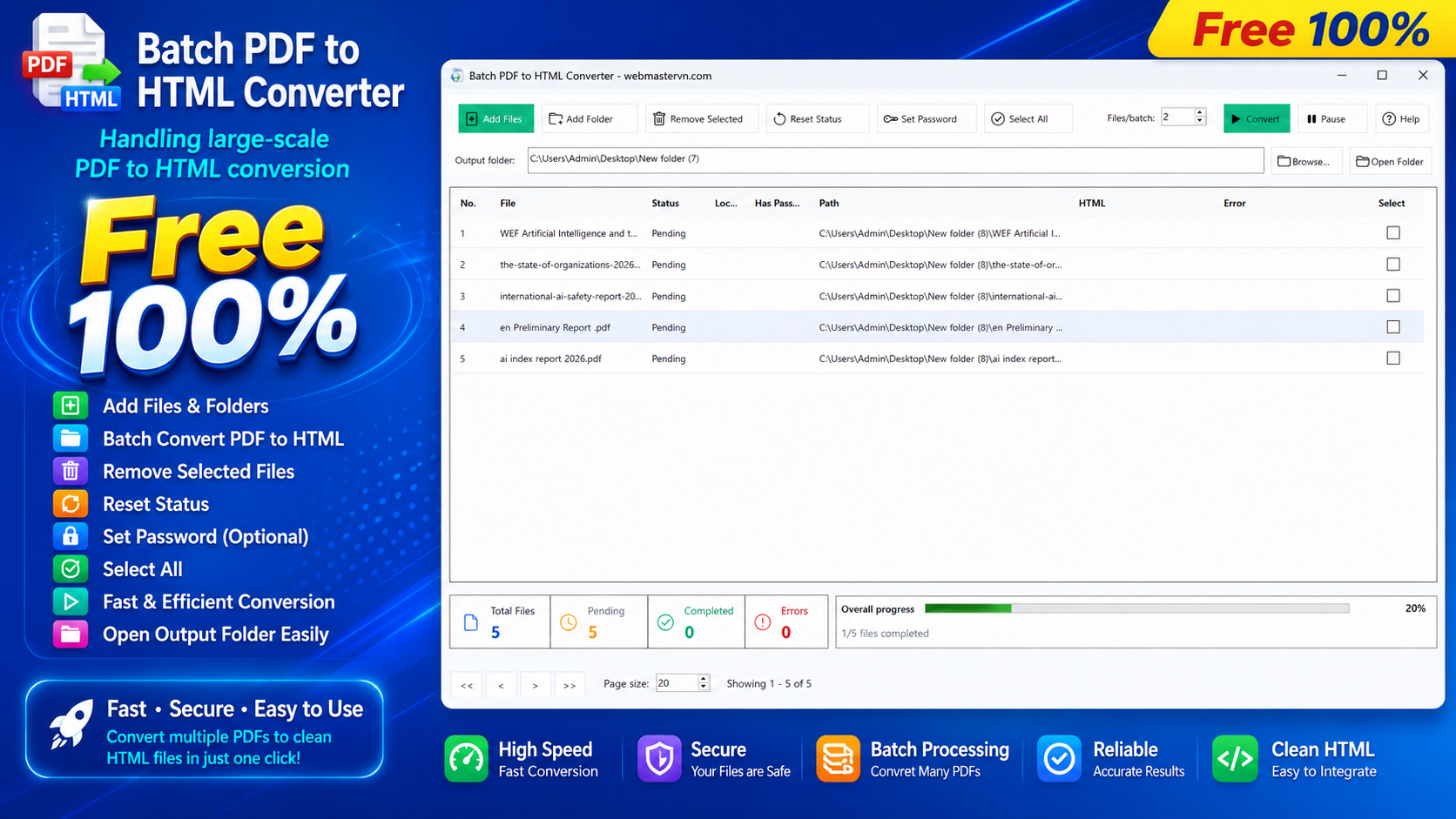
- Real-time statistics showing waiting, processing, completed, and failed files.
4. Intelligent Parallel Processing
- Configure the number of concurrent conversion tasks.
- Uses a Worker Pool architecture to maximize performance while efficiently utilizing system resources.
- Ensures stable, continuous processing even for extremely large document collections.
5. Pause and Resume Support
- Pause the conversion process at any time.
- Resume processing without restarting the entire task.
- Built-in progress bar for monitoring overall conversion progress.
6. Password-Protected PDF Support
- Automatically detects encrypted PDF files.
- Assign passwords to multiple PDF files simultaneously.
- Converts password-protected PDFs when valid passwords are provided.
7. Full Unicode File Name Support
- Fully supports Unicode file names, including Vietnamese and other international characters.
- Minimizes common I/O errors caused by special characters in file paths.
- Improves reliability on Windows systems.
8. Modern and User-Friendly Interface
- Clean, professional Windows desktop interface.
- Frequently used functions—including Add Files, Add Folder, Delete, Reset Status, Assign Password, and Convert—are conveniently located on the main toolbar.
- Dedicated output folder selection panel.
- Built-in statistics dashboard and progress bar for easy monitoring.
How to Use
- Select the output folder for HTML files.
- Add PDF files or import an entire folder.
- Configure the number of parallel conversion tasks.
- Assign passwords to protected PDF files if necessary.
- Click Convert to start the conversion.
- Monitor the progress and use Pause or Resume whenever needed.
- When the process is complete, open the output folder to access the generated HTML files.
Feedback and Contributions
Batch PDF to HTML Converter is actively under development and will continue to receive new features, performance improvements, and usability enhancements.
If you encounter any issues or have ideas that could improve the software, we would greatly appreciate your feedback. Every suggestion helps us build a better product.
Thank you for choosing Batch PDF to HTML Converter.
We wish you a productive, efficient, and successful experience using our software!
Recommended Software

BIDM - Basic Internet Download Manager

ISO Editor

Easy Batch Rename
PDF Easy Fast Viewer