
Download
| Version | Channel | |
|---|---|---|
| V1.0.0 | Free | Download |
Description
BIDM (Basic Internet Download Manager) – Free, Fast File Management and Download Software for Windows
Introduction to BIDM
BIDM (Basic Internet Download Manager) is a file management and download software designed for Windows, developed to provide a simple, lightweight, stable, and easy-to-use downloading solution. Without the need for complex settings, BIDM helps users manage their entire download list, track progress in real-time, and process multiple download links in batches with just a few clicks.
Unlike direct browser downloads, BIDM offers professional download management capabilities, supporting the addition of multiple links simultaneously, importing URL lists from TXT or CSV files, pausing, resuming downloads, saving task states, and restoring data upon reopening the software.
With its intuitive interface and stable processing performance, BIDM is suitable for both individual users and businesses that regularly work with large volumes of files from the Internet.
Who Should Use BIDM?
BIDM is the right choice for a wide range of user groups:
Those who frequently download documents, videos, images, or software from the Internet.
Those who need to download hundreds or thousands of links from a list.
Website administrators, programmers, or office staff who regularly work with multiple URLs.
Those who want to centrally manage the entire download process instead of relying on the browser.
Those who need a free, lightweight yet feature-rich file download software.
Key Features of BIDM
Centralized Download List Management
All download links are managed in a unified interface, allowing users to:
Add new download URLs.
Edit information for each link.
Delete one or more download items.
Save all data to an SQLite database to ensure safety when closing or restarting the software.
Each download task stores complete information including:
Download URL
File name
Save folder
Total size
Downloaded size
Progress percentage
Status
Error messages (if any)
Add Multiple URLs with a Single Paste
The
"Paste URL" feature allows BIDM to automatically read the entire
content from the Clipboard and split it into multiple download links.
Simply
copy the URL list from your browser, email, or text document, then
paste it directly into the software to create multiple download tasks in
seconds.
Import Download List from TXT File
BIDM supports importing URL lists from text files (.TXT).
Each
line corresponds to one download address, and the software will
automatically recognize, validate, and add valid links to the download
list.
This is a highly useful solution when working with large numbers of links.
Support for Importing Data from CSV Files
In addition to TXT, BIDM also supports importing data from CSV files to serve bulk download needs.
Supported formats include:
url (required)
file name
file_name
name
This feature is especially useful when data is exported from management systems, websites, or other applications.
Quick Search
The download list can be instantly searched by:
File name
URL
Error content
Even with thousands of items in the list, searching remains fast and convenient.
Filter by Status
BIDM helps users track download progress with smart filters:
All
Downloading
Completed
Queued
Failed
With just one click, the list is displayed according to the desired status.
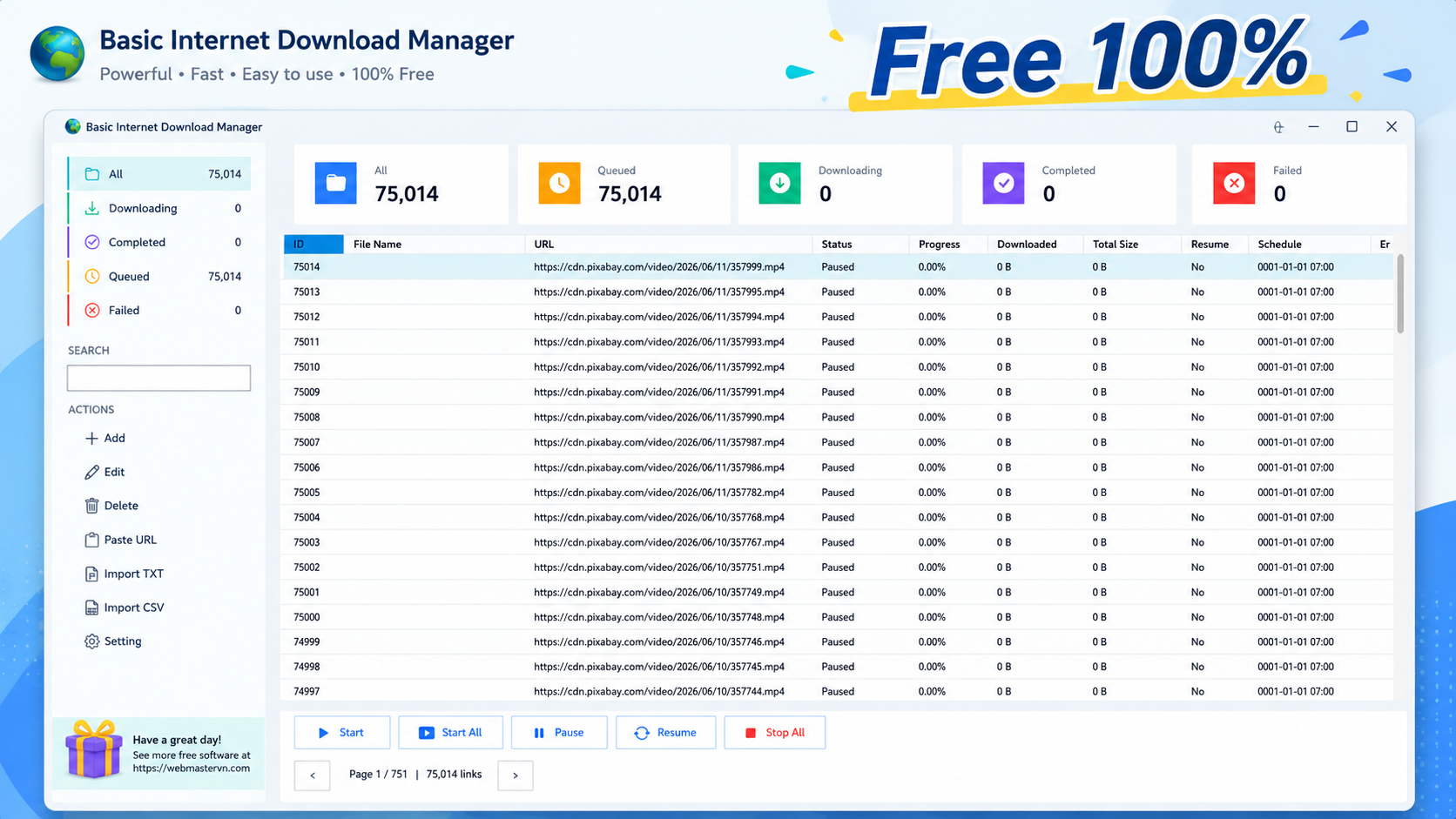
Visual Statistics Dashboard
Directly on the main interface, BIDM displays comprehensive statistics:
Total links
Queued tasks
Downloading tasks
Completed tasks
Failed tasks
Users can always stay informed about the overall status of the entire download process.
Flexible Download Controls
BIDM provides full operational support:
Start
Pause
Resume
Stop
Users can control single files or multiple files simultaneously with real-time status updates.
Batch Download in Groups
To ensure performance, the "Start All" function is designed to download sequentially in groups.
Default settings:
Process a maximum of 5 files per batch.
After completing one group, automatically move to the next.
Failed links are automatically skipped without interrupting the entire process.
This mechanism helps:
Reduce system load.
Prevent interface freezing.
Ensure stable operation with very large download lists.
Stop Entire Download Process
With just the "Stop All" button, users can:
Stop all currently downloading tasks.
Halt the batch download process.
Switch all tasks to paused status for later resumption.
Proactive Control When Opening the Software
To avoid unintended bandwidth usage, BIDM does not automatically resume old tasks on startup.
Previous tasks are switched to "Paused" status, giving users full control over when to start downloading again.
Set File Save Folders
Users can customize:
Download Folder – where files are saved after completion.
Temp Folder – where temporary data is stored during the download process.
All settings are remembered for subsequent sessions.
Default folders:
Downloads\BIDM
%LocalAppData%\BIDM\Temp
Real-Time Progress Tracking
During download, BIDM continuously updates:
Completion percentage
Total file size
Downloaded size
Resumable status
Current status
Error messages
All data is synchronized with the database to ensure accuracy.
Support for Resume Download
When the server supports HTTP Range Requests, BIDM can:
Resume downloading from the unfinished portion.
Avoid re-downloading from scratch.
Significantly save time and bandwidth.
For large files where the server supports Byte Range, the software can also download in multiple segments to optimize performance.
Smart Pagination
The download list supports pagination to:
Improve display speed.
Reduce interface load.
Easily manage thousands of download tasks.
Modern, User-Friendly Interface
BIDM is designed with a scientific layout including:
Status management sidebar.
Statistics overview area.
Central download list.
Quick control toolbar.
Pagination area.
Even new users can get familiar within minutes.
Why Choose BIDM?
✔ Simple, easy-to-use interface.
✔ Centralized download management.
✔ Batch download support.
✔ Import URLs from Clipboard, TXT, and CSV.
✔ Real-time progress tracking.
✔ Resume download support.
✔ Flexible download folder management.
✔ Data stored using SQLite.
✔ Stable operation with large download lists.
✔ Free and continuously updated.
Conclusion
BIDM (Basic Internet Download Manager) is a free download management software for Windows, developed with the goal of delivering a fast, stable, and easy-to-use file downloading experience. From downloading a few small files to managing thousands of links, BIDM performs well thanks to its batch processing capabilities, intelligent status management, and user-friendly interface.
The software is still under development and continuously being improved. We always appreciate feedback from the community to make BIDM even better.
Thank you for choosing BIDM. Wishing you fast, safe, and efficient downloading experiences!
Recommended Software

Join Videos Losslessly
PDF Easy Fast Viewer

Easy Batch Rename


Adobi Sound Editor - The Modern, Fast, and Free Audio Workstation for Everyone