
Download
| Version | Channel | |
|---|---|---|
| V1.0.0 | Free | Download |
Description
ISO Editor – Professional ISO File Creator, Viewer and Editor for Windows
Introduction
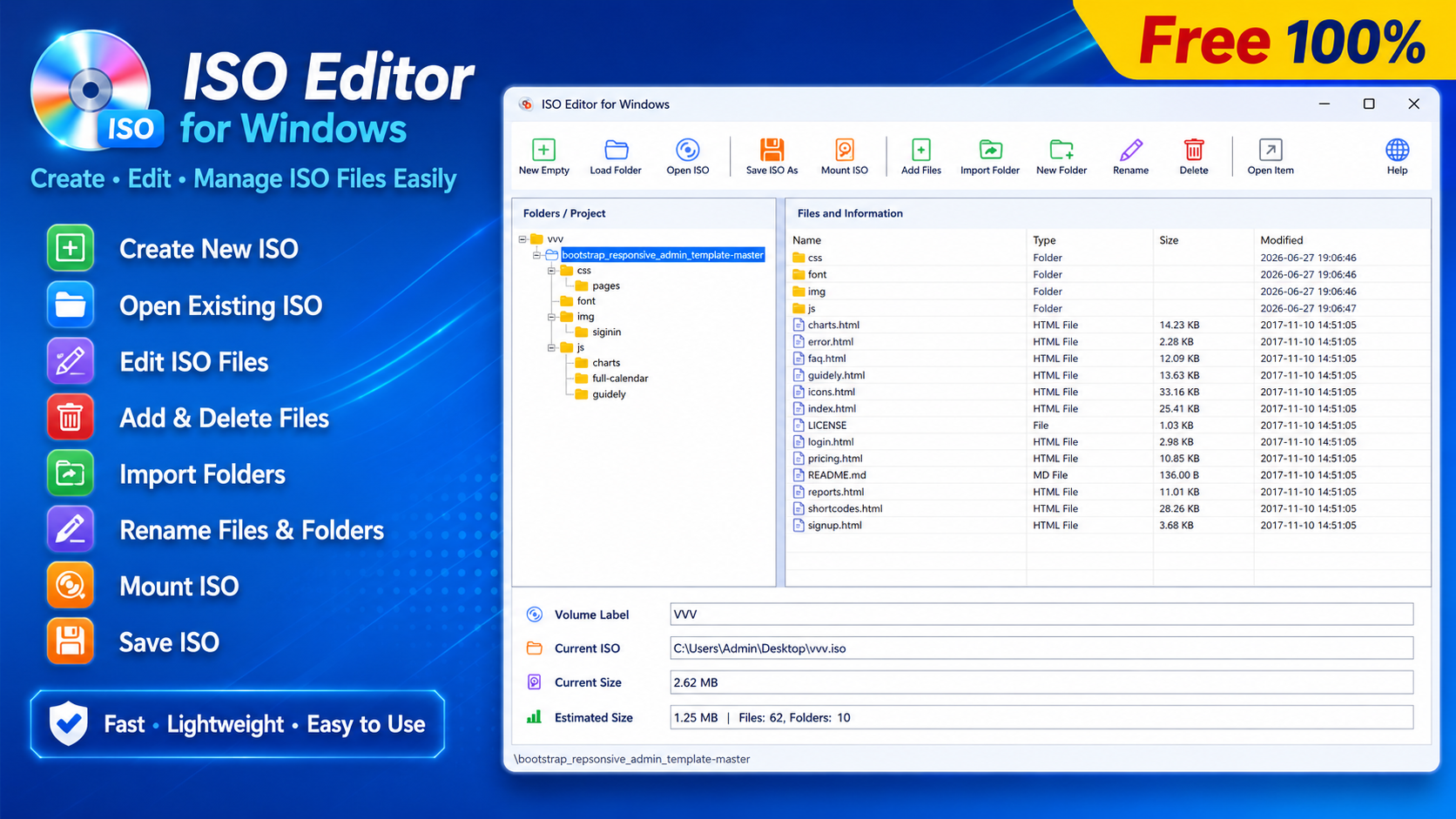
ISO Editor is a powerful Windows application designed to help you create ISO files, open ISO images, edit ISO file contents, and save your changes as a new ISO image quickly, securely, and efficiently.
Instead of relying on multiple utilities for creating and modifying ISO images, ISO Editor combines all essential features into a single application. You can easily add files and folders, delete unwanted content, rename items, and reorganize the directory structure inside an ISO image without extracting the entire archive.
With its modern interface, high-performance processing engine, and excellent compatibility, ISO Editor is an ideal solution for IT professionals, system administrators, software developers, businesses, and anyone who regularly works with ISO image files.
Key Features
ISO Editor provides a complete set of tools for managing ISO image files.
- Create new ISO files from existing folders or data.
- Open and browse ISO image files directly.
- Edit ISO contents without extracting the image.
- Add files and folders to an ISO image.
- Create new folders inside ISO files.
- Rename or delete files and directories.
- Reorganize the folder structure before saving.
- Save ISO files with excellent Windows compatibility.
- Monitor file size and processing progress in real time.
- Modern, intuitive, and user-friendly interface.
- Professional installer with automatic .ISO file association.
Benefits of Using ISO Editor
ISO Editor simplifies every stage of working with ISO images—from creation and editing to packaging and distribution.
With ISO Editor, you can:
- Create software installation ISO images.
- Package files and folders for storage or distribution.
- Back up important documents and system data as ISO images.
- Modify existing ISO files without rebuilding them from scratch.
- Manage directory structures visually and efficiently.
- Save time when working with large ISO image files.
- Prepare Windows, Linux, and custom software installation media.
Detailed Features
1. Create ISO Files from Folders
Simply select a source folder, and ISO Editor will automatically analyze the directory structure, calculate the required size, and generate a new ISO image in just a few clicks.
The software preserves the original folder hierarchy to ensure maximum accuracy and compatibility.
2. Open and Edit ISO Files
ISO Editor allows you to open existing ISO images and modify their contents directly without extracting the archive.
Supported operations include:
- Add files.
- Add folders.
- Create new folders.
- Rename files.
- Rename folders.
- Delete unnecessary files and directories.
- Reorganize folder structures.
- Prepare content before exporting a new ISO image.
All operations are performed through an intuitive tree-view interface, making ISO editing simple and efficient.
3. Visual File Management
ISO Editor displays the complete directory tree and file list inside the ISO image, allowing you to:
- Browse folder structures.
- Check file sizes.
- Manage directories efficiently.
- Review all modifications before saving.
This significantly reduces errors when working with large ISO images.
4. Real-Time Progress Monitoring
During ISO creation, editing, or saving, ISO Editor provides real-time information, including:
- Progress bar.
- Processed data size.
- Current operation status.
- Processing time.
This allows you to monitor every step of the workflow with confidence.
5. High Compatibility
ISO files created with ISO Editor are fully compatible with modern Windows operating systems and most popular ISO mounting applications.
They can be used for:
- Operating system installation.
- Software distribution.
- Data archiving.
- System backups.
- Creating custom installation media.
6. Easy Installation and Deployment
ISO Editor includes a professional installation package that supports:
- Desktop shortcut creation.
- Start Menu integration.
- Automatic .ISO file association.
- Clean uninstallation.
- Quick startup after installation.
Who Should Use ISO Editor?
ISO Editor is suitable for a wide range of users, including:
- IT professionals.
- System administrators.
- Software developers.
- Programmers.
- Office users.
- Businesses and organizations.
- Educational institutions.
- Anyone who regularly works with ISO image files.
Why Choose ISO Editor?
Unlike many ISO management tools, ISO Editor combines simplicity, performance, and powerful functionality in a single lightweight application.
Key Advantages
- Modern and easy-to-use interface.
- Create, open, and edit ISO files within one application.
- Edit ISO images without extracting their contents.
- Fast ISO creation and saving.
- Stable and reliable performance.
- Low system resource usage.
- Supports large ISO image files.
- Suitable for both beginners and advanced users.
- Regular updates with new features and improvements.
Download ISO Editor Today
If you're looking for a reliable ISO Creator, ISO File Editor, ISO Image Manager, or Windows ISO Tool, ISO Editor is the perfect solution.
It provides an intuitive interface, high-speed performance, excellent compatibility, and all the tools you need to create, edit, and manage ISO image files efficiently.
Feedback and Future Development
ISO Editor is continuously being improved with new features, performance enhancements, and usability updates.
We highly value feedback from our users. If you have suggestions, feature requests, or discover any issues, we encourage you to share them with us.
Your feedback helps us make ISO Editor better with every release.
Thank you for choosing ISO Editor. We wish you a productive, efficient, and enjoyable experience using our software.
Recommended Software

Easy Screen Recorder
PDF Easy Fast Viewer

Easy Batch Rename

Batch PDF to HTML Converter